It’s 7:45 AM, and the chaos is already in full swing. One child can’t find their soccer cleats, another forgot about a school project due today, and you’re frantically scrolling through three different apps trying to remember who has a dentist appointment this afternoon. Sound familiar? For millions of families, this kind of morning isn’t the exception — it’s the routine.
Managing a household full of schedules, chores, extracurricular activities, and work commitments is genuinely hard. Paper calendars get lost, sticky notes fall off the fridge, and coordinating across multiple apps means important things inevitably slip through the cracks. The result is stress, missed appointments, and a household that feels perpetually one step behind.
A digital calendar display offers a smarter way forward — one centralized, always-visible hub that keeps every family member informed, accountable, and on track. In this guide, we’ll walk you through everything you need to know to find the best digital calendar display for your family’s unique needs. We’ll cover the essential features to look for, explore how solutions like Everblog HomeCal are purpose-built for busy households, and provide practical steps to get your family organized and thriving.
The Modern Family Dilemma: Why You Need the Best Digital Calendar Display
Most families don’t struggle because they’re disorganized by nature — they struggle because their tools can’t keep up. A soccer practice gets added to one parent’s phone, a dentist reminder lives on a sticky note, and the weekly chore list exists somewhere between a whiteboard and a group chat that nobody checks. When your family’s schedule is scattered across five different places, something always falls through the cracks. That’s not a personal failure; it’s a systems problem.
The real cost of this fragmentation goes beyond missed appointments. Kids who can’t see their responsibilities laid out clearly are less likely to follow through on them. Parents who spend mental energy tracking everyone’s obligations have less bandwidth for everything else. And when chores feel like a moving target — assigned verbally, forgotten quickly — family tension builds fast. What busy households genuinely need isn’t another app to check; they need one always-on, centralized system that every family member can see and interact with without being prompted.
A digital calendar display addresses this directly. Mounted in a common area like the kitchen or hallway, it becomes the household’s single source of truth — showing today’s schedule, pending chores, upcoming events, and individual responsibilities at a glance. No one needs to ask what’s happening or who’s responsible for what. The information is simply there, visible and current.
Identifying Core Family Needs
Before choosing any solution, it helps to get specific about what your household actually requires. Most families share a few core needs: a unified platform where every member’s schedule lives together, a visual and intuitive way to assign and track chores, and enough engagement to actually motivate kids to participate. Younger children respond well to color-coded tasks and reward-based systems, while teenagers need something that doesn’t feel condescending. Parents, meanwhile, need administrative control without a steep learning curve. The best digital calendar display for families balances all of these demands — making organization feel less like a chore in itself and more like a natural part of daily life.
Essential Features of the Best Digital Calendar Display for Families
Not every digital calendar is built with families in mind. Some are designed for solo professionals, others for corporate teams — and while they might technically work for household use, they often miss the mark in ways that matter. Choosing the best digital calendar display for families means knowing which features actually move the needle on daily coordination versus which ones just look impressive in a demo. The right solution needs to work for a six-year-old and a working parent simultaneously, without either one feeling frustrated.
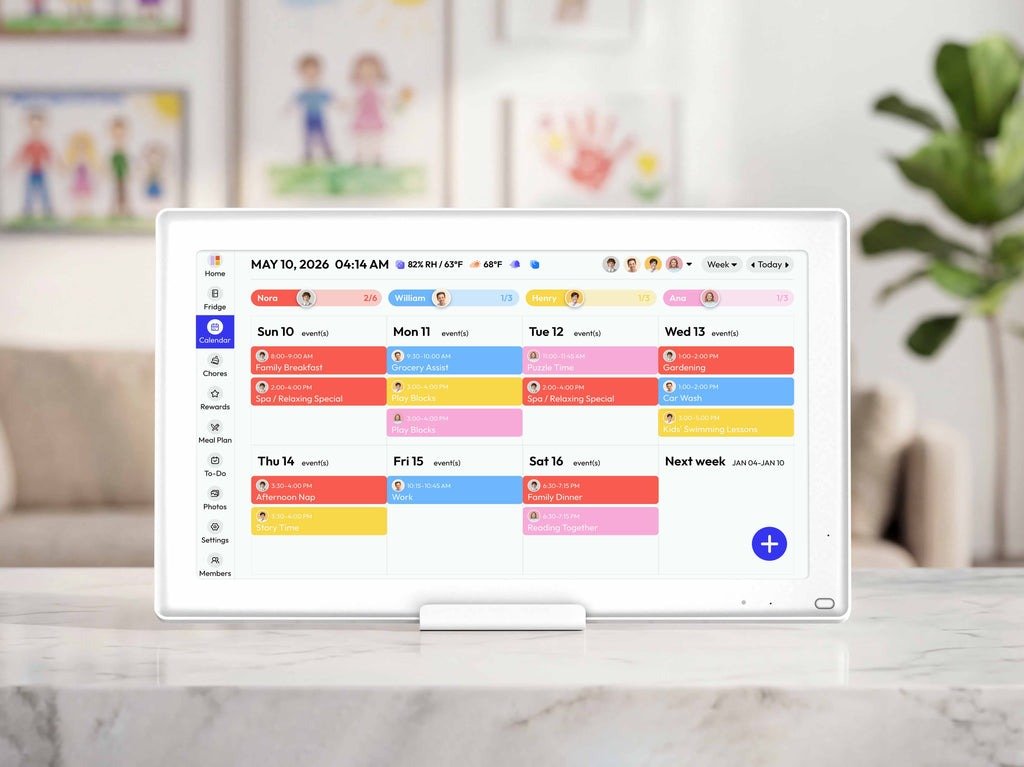
Real-time syncing is non-negotiable. When one parent adds a last-minute orthodontist appointment from the office, that update needs to appear on the home display immediately — not after a manual refresh. Equally important is an interface intuitive enough that kids can navigate it without help. Color-coding by family member, simple icons for different event types, and age-appropriate task views all reduce the friction that causes people to abandon systems. Customization matters here too: the ability to set personalized alerts, adjust display themes, and tailor notification preferences means the calendar adapts to your household rather than the other way around. Everblog HomeCal, for instance, offers per-member color profiles and flexible reminder settings that let families configure the experience around how they actually live. Durability and reliable hardware round out the essentials — a touchscreen that freezes or a display that dims unpredictably becomes a source of frustration rather than a solution.
Sync and Accessibility for On-the-Go Families
Modern families are rarely all in one place at the same time, which means a home display is only half the equation. Cloud-based syncing ensures that updates made anywhere — from a parent’s work laptop, a teenager’s phone, or the kitchen display itself — propagate instantly across every device. This bidirectional access is what transforms a wall-mounted screen from a passive display into an active coordination tool. Parents can add events remotely, kids can check their chore status from their rooms, and everyone stays aligned without a single group text.
Task Management Integration for Efficient Chores
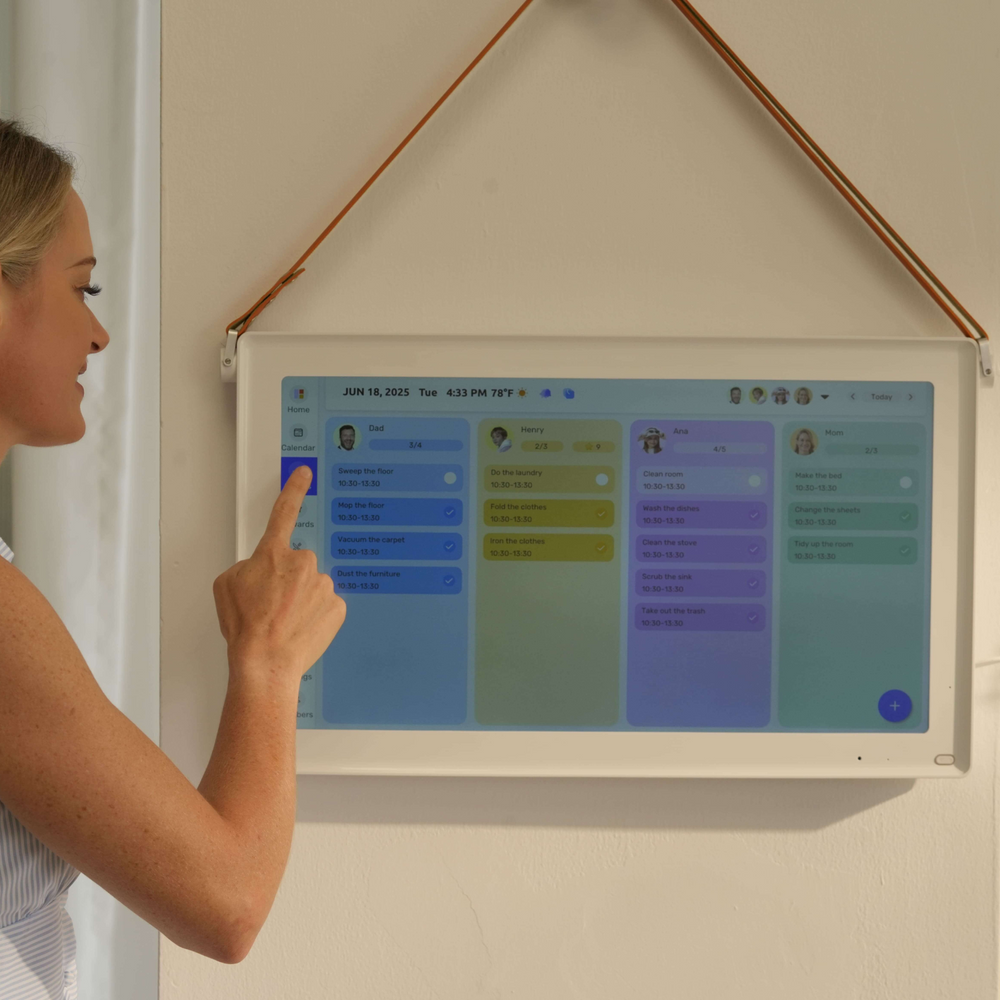
A calendar that only shows events misses a significant portion of what keeps families organized. Built-in task management — the ability to create, assign, and track chores directly within the same platform — eliminates the need for a separate whiteboard or app. When chore assignments appear alongside calendar events in one unified view, accountability becomes visual and automatic. Features like completion checkboxes, recurring task scheduling, and assignment by family member mean parents spend less time following up and kids have a clear, unambiguous picture of what’s expected of them each day.
Everblog HomeCal: A Case Study in Family-Friendly Digital Calendars
Understanding what makes a digital calendar genuinely work for families is one thing — seeing it in practice is another. Everblog HomeCal was designed specifically around the realities of household life, not adapted from a corporate productivity tool. The result is a platform that feels immediately intuitive to parents while remaining accessible and even appealing to kids. From the moment it’s mounted in your kitchen or hallway, it functions as a living household dashboard rather than just a screen showing dates.
The setup process reflects this family-first philosophy. Each member gets their own profile with a distinct color, so a quick glance at the display tells you whose events are whose without reading a single word. Parents retain administrative control — approving schedule changes, setting task deadlines, and configuring notification preferences — while kids interact with a simplified view tailored to their age and responsibilities. This layered access model means the same device serves a seven-year-old and a working parent without either one feeling like they’re using the wrong tool.
Compatibility is broad by design. Everblog HomeCal syncs with Google Calendar, Apple Calendar, and other widely used platforms, so families don’t have to abandon their existing digital habits. Events added on a parent’s phone appear on the home display within seconds, and task completions logged by a child update in real time across all connected devices. The hardware itself is built for the wear and tear of daily family life — a responsive touchscreen that holds up to repeated use and a display bright enough to read clearly in a busy, well-lit kitchen.
How Everblog HomeCal Streamlines Chore Management
Assigning chores through Everblog HomeCal takes minutes and eliminates the back-and-forth that typically surrounds household task management. Parents create tasks directly on the display or through the companion app, assign them to specific family members, set due dates, and choose whether they recur daily, weekly, or on a custom schedule. Each assigned chore appears on the relevant child’s profile view with a clear status indicator — pending, in progress, or complete. When a child marks a task done, parents receive a notification and the display updates automatically. There’s no ambiguity about what’s been done and what hasn’t, which removes the most common source of chore-related friction: the “I didn’t know I was supposed to do that” conversation.
Making Chores Fun with Gamification Features
Getting kids to engage consistently with chores requires more than just clear instructions — it requires motivation that feels relevant to them. Everblog HomeCal addresses this through a built-in reward system where completed tasks earn points that accumulate toward goals set by parents. A child who finishes their weekly responsibilities might unlock screen time, a special outing, or a small reward chosen in advance. Badges mark milestones — a streak of completed chores, a perfect week, a first solo task — giving kids visible recognition of their progress. For younger children especially, seeing their avatar level up or their badge collection grow creates a genuine sense of accomplishment tied directly to household contribution. Parents can customize the reward structure entirely, keeping it aligned with their family’s values and what actually motivates their specific kids rather than relying on generic incentives.
Step-by-Step Guide to Implementing Your Digital Calendar Display
Knowing which features matter is only useful if you can actually get the system up and running in a way that sticks. Implementation is where most families stumble — not because the technology is complicated, but because the rollout wasn’t thoughtful. A phased, deliberate approach makes the difference between a display that transforms your household and one that collects dust after two weeks.
Start by auditing your family’s actual pain points. Which schedules are currently falling through the cracks? Are chores the main friction point, or is it appointment coordination? Understanding your specific gaps helps you prioritize features and avoid paying for capabilities you won’t use. From there, research options with those needs as your filter — a family with young children should weight gamification and visual simplicity heavily, while a household of teenagers might prioritize mobile accessibility and two-way syncing. Once you’ve selected a platform like Everblog HomeCal, mount the display in a high-traffic area — the kitchen or main hallway — where everyone passes it naturally rather than having to seek it out. Connect it to your home Wi-Fi, link existing calendars from Google or Apple, and create individual profiles for each family member before adding a single event. Populate the first week’s schedule together as a family, then layer in recurring chores with clear ownership. Finally, activate whatever reward or gamification features the platform offers before your first full week begins, so kids experience the engagement loop from day one rather than as an afterthought.
Choosing the Right Display and Setup Tips
Placement is the single most important physical decision you’ll make. A display mounted in a low-traffic room gets ignored; one positioned at eye level near the kitchen exit becomes unavoidable. Aim for a wall with natural sight lines during the morning routine — near the door, above a charging station, or beside the breakfast area. For connectivity, a wired ethernet connection is more reliable than Wi-Fi if your router is nearby, but a strong Wi-Fi signal works well for most homes. During initial setup, spend time on color assignments and notification preferences before inviting the rest of the family in — a polished, personalized display on first impression generates more buy-in than a half-configured one.
Engaging the Whole Family in the Process
The fastest way to kill adoption is to present the system as a parental mandate rather than a shared tool. Involve kids in the setup from the beginning — let them choose their profile color, pick their avatar if the platform supports it, and weigh in on which chores they’d prefer. Teenagers especially respond better when they have some agency in how their responsibilities are structured. Hold a short family kickoff — fifteen minutes, no longer — where you walk through the display together, explain how tasks get marked complete, and demonstrate how the reward system works. Revisit the setup after the first two weeks to adjust anything that isn’t working. A system that evolves with your family’s feedback becomes genuinely theirs rather than something imposed on them.
Building a Calmer, More Connected Family Routine
Managing a busy household doesn’t have to mean constant chaos, missed appointments, and chore battles. As we’ve explored throughout this guide, the right digital calendar display transforms how families coordinate — replacing scattered sticky notes and competing apps with one centralized, always-visible system that everyone can actually use. The key is knowing what to look for: real-time syncing, an intuitive interface that works for both kids and adults, integrated task management, and engagement features that make participation feel rewarding rather than obligatory.
Solutions like Everblog HomeCal demonstrate what’s possible when technology is designed around real family life rather than adapted from tools built for other contexts. From color-coded profiles and seamless chore assignment to gamified rewards that genuinely motivate kids, the right platform does more than display dates — it builds household habits that reduce stress and improve daily coordination for everyone involved.
The best time to make a change is before the next chaotic morning catches you off guard. Start by identifying your family’s biggest scheduling pain points, explore your options with those needs as your guide, and commit to a thoughtful rollout that brings every family member into the process. A display that feels like everyone’s tool — not just a parental directive — is one that actually gets used. With the right system in place, a calmer, more connected family routine isn’t just possible. It’s already waiting for you.