Walking into the world of gaming peripherals for the first time can feel like stepping into a foreign country where everyone speaks a language of switches, actuation points, and polling rates. You just want a keyboard that makes you better at your favorite games, but the sheer number of options threatens to paralyze any decision before it starts. Here’s the good news: programmable mechanical gaming keyboards aren’t as complicated as they seem, and once you understand the basics, you’ll wonder why you ever hesitated.
These keyboards represent one of the most impactful upgrades a gamer can make — offering the ability to customize every key, automate complex commands, and fine-tune your setup to match your exact playstyle. This guide is designed specifically for beginners who want clarity without the jargon overload. We’ll walk through what makes these keyboards special, break down the different types available, explore layouts and connectivity options, and finish with a practical step-by-step buying guide that puts you in control of your first purchase.
What Are Programmable Mechanical Keyboards?
A mechanical keyboard uses individual physical switches beneath each key, unlike membrane keyboards that rely on a single rubber sheet to register presses. Each mechanical switch contains a spring and metal contact point, delivering a distinct feel and reliable actuation every single time you press down. This consistency is what separates mechanical keyboards from their squishier counterparts and why serious gamers gravitate toward them.
The “programmable” part is where things get exciting. These keyboards ship with companion software that lets you remap any key to perform a different function, build macros that execute complex command sequences with a single press, assign game-specific profiles that activate automatically, and customize RGB lighting to match your mood or serve as visual indicators during gameplay. Imagine binding an entire combo string in a fighting game to one button, or swapping your movement keys to a layout that feels more natural to you — that’s the power of programmability.
For gamers, this translates directly into performance. Instead of fumbling through awkward key combinations during a heated match, you execute precisely what you need in fewer movements. Your keyboard adapts to you rather than forcing you to adapt to it, shaving milliseconds off reactions and reducing mental load so you can focus on strategy and execution. This is exactly why programmable mechanical keyboards have become essential tools for competitive and casual gamers alike.
Exploring the Different Types of Gaming Keyboards
Before you commit to a purchase, understanding the three main keyboard categories helps you decide where to invest your money. Each type serves a different need, and knowing the trade-offs upfront prevents buyer’s remorse down the road.
Mechanical Keyboards: The Gamer’s Standard
Mechanical keyboards dominate competitive gaming for good reason. Each key houses an independent switch that falls into one of three families: linear switches glide straight down without resistance, making them ideal for rapid repeated presses in shooters; tactile switches provide a small bump at the actuation point so you know exactly when a keypress registers; and clicky switches add an audible click on top of that bump for maximum feedback. Beyond feel, mechanical switches last significantly longer than alternatives — often rated for 50 to 100 million keypresses — and they deliver the same consistent response from the first day you use them to years later. For any gamer serious about performance and longevity, mechanical is the gold standard.
Membrane Keyboards: The Budget-Friendly Option
Membrane keyboards register presses through a flexible rubber dome sheet that collapses when you push down. They’re considerably cheaper and operate more quietly, which makes them appealing if you’re on a tight budget or share a space where noise matters. However, the mushy feel makes it harder to tell exactly when a key activates, and the rubber degrades over time, leading to inconsistent responses. A membrane board works as a temporary starting point, but most gamers who try mechanical never look back.
Hybrid Keyboards: A Middle Ground
Mecha-membrane keyboards attempt to split the difference by placing mechanical-style click mechanisms on top of a rubber dome base. You get a slightly more tactile feel than pure membrane without the full cost of true mechanical switches. These can serve as a stepping stone if your budget won’t stretch to a fully mechanical board yet, though they lack the precise actuation and durability that make mechanical keyboards worth the investment long-term.
Understanding Keyboard Layout for Gaming
Keyboard size directly affects how you play, and choosing the right layout is more than an aesthetic decision — it determines how much desk real estate you surrender and how far your hands travel during intense sessions. Full-size keyboards include everything: a number pad, function row, navigation cluster, and arrow keys. They’re familiar and versatile, but they push your mouse further to the right, which can strain your shoulder during long gaming sessions and limit sweeping mouse movements in shooters.
Tenkeyless (TKL) boards drop the number pad while keeping everything else intact, freeing up several inches of desk space. This is the sweet spot for most gamers because you retain dedicated arrow keys and function keys without sacrificing mouse room. The 75% layout compresses things further by squishing the function row and navigation keys closer together, giving you nearly the same functionality in a more compact footprint. Then there’s the 60% layout, which strips away the function row, arrow keys, and navigation cluster entirely — accessing those functions through key combinations instead. Competitive FPS players often favor 60% or 65% boards because maximum mouse space translates to smoother aim tracking.
Think about what you actually play. MMO and strategy gamers benefit from full-size or TKL layouts where extra keys mean more bindings without layers. FPS players should lean toward TKL or smaller to prioritize mouse freedom. If you’re unsure, TKL offers the safest balance of functionality and space savings for a first programmable mechanical keyboard.
The Great Debate: Wired vs. Wireless Gaming Keyboards
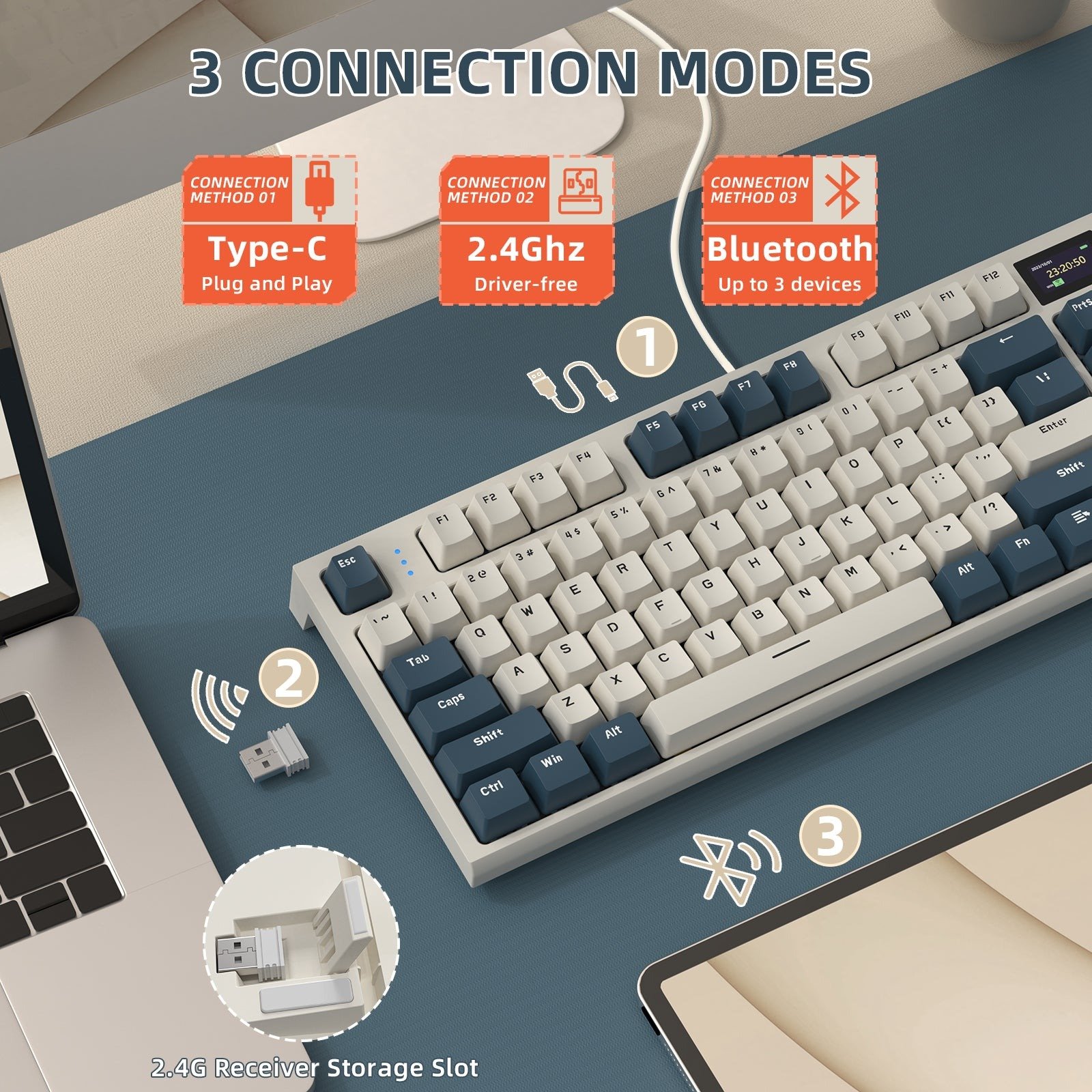
Connectivity might seem like a minor detail, but it affects your daily experience more than you’d expect. Wired keyboards connect via USB and deliver input signals with virtually zero delay — every keypress reaches your PC as fast as physically possible. There’s no battery to charge, no signal interference to worry about, and no wireless dongle to lose. For a beginner who wants one less variable to think about, wired remains the simplest and most reliable choice.
Wireless gaming keyboards have closed the gap dramatically in recent years. Modern 2.4GHz wireless connections now achieve polling rates that rival wired boards, making latency differences imperceptible to all but the most elite professional players. The trade-off is battery management — you’ll need to remember charging schedules or keep a cable handy as backup — and wireless boards typically cost more for equivalent features. The payoff is a cleaner desk with no cable drag affecting your setup aesthetics or getting tangled with your mouse cord.
If you’re buying your first programmable mechanical keyboard and want guaranteed performance without extra complexity, go wired. You’ll save money and never deal with a dead battery mid-match. However, if desk cleanliness matters to you and your budget allows it, today’s wireless options from reputable brands deliver gaming-grade responsiveness that won’t hold you back competitively.
Your Step-by-Step Buying Guide for the First Programmable Mechanical Keyboard
Now that you understand the landscape, it’s time to turn knowledge into action. Buying your first programmable mechanical keyboard doesn’t require hours of research paralysis — follow these five steps and you’ll land on a board that serves you well for years.
Step 1: Determine Your Budget
Set a realistic spending range before you start browsing. Entry-level programmable mechanical keyboards deliver solid performance and basic customization software that covers most beginners’ needs. Mid-range options add premium build materials, better stabilizers for smoother key feel, and more sophisticated software suites. High-end boards introduce hot-swappable switches, wireless connectivity, and aluminum construction. The sweet spot for most beginners sits in the mid-range, where you get reliable programmability and build quality without paying for enthusiast features you won’t immediately use. Avoid the cheapest options — saving a small amount upfront often means sacrificing the software quality that makes programmability worthwhile.
Step 2: Choose Your Switch Type
Your switch choice shapes every moment you spend at your keyboard. Linear switches suit gamers who need rapid, uninterrupted keypresses — think competitive shooters where you’re spamming movement keys constantly. Tactile switches work beautifully for players who want confirmation that a key registered without bottoming out, which helps in games requiring precise single inputs. Clicky switches offer the most satisfying feedback but generate noise that can bother housemates or get picked up by your microphone. If possible, order a switch tester — a small sampler board with different switch types mounted on it — so you can feel the differences firsthand before committing.
Step 3: Select the Right Layout and Size
Ask yourself two questions: do you need a number pad for your games or daily work, and how much desk space can you dedicate to your keyboard? If you answered yes to the number pad and have a large desk, full-size works. If you don’t need the number pad, TKL gives you everything else while freeing mouse room. If desk space is tight or you play primarily FPS titles, consider 65% or 75% layouts that retain arrow keys in a compact frame. Skip 60% for your first board unless you’re comfortable memorizing function layers from day one.
Step 4: Prioritize Key Features
Not all programmable keyboards deliver equal software experiences. Before purchasing, verify that the companion software supports full key remapping, macro creation with adjustable delays, and multiple profile storage so you can switch configurations between games instantly. Beyond programmability, evaluate build quality by checking whether the frame uses steel or aluminum reinforcement, whether the keycaps are doubleshot PBT rather than thin ABS that develops shine quickly, and whether dedicated media controls or a volume wheel matter to your workflow. RGB lighting is enjoyable but should rank below software quality and construction in your priorities.
Step 5: Research and Read Reviews
Once you’ve narrowed your options to two or three keyboards matching your criteria, dig into reviews from people who actually game on them daily. YouTube reviewers who perform typing tests and latency measurements give you real-world data. Reddit communities dedicated to mechanical keyboards and gaming peripherals offer honest long-term ownership impressions that manufacturer pages never will. Pay attention to comments about software stability specifically — buggy companion apps can undermine even the best hardware. Brands like ATTACK SHARK have gained attention in these communities for offering feature-rich programmable boards at accessible price points, making them worth investigating during your research phase. Look for reviewers who share your experience level, since a professional esports player’s priorities differ significantly from a beginner’s needs.
Making Your First Programmable Keyboard Purchase with Confidence
Choosing your first programmable mechanical gaming keyboard doesn’t have to be overwhelming. The core principles are straightforward: mechanical switches deliver the precision and durability that elevate your gaming, while programmability lets you mold the keyboard around your playstyle rather than settling for factory defaults. These two elements together give you a genuine competitive edge and a more enjoyable experience every time you sit down to play.
Your decision path is simpler than the market makes it seem. Set a budget that reaches into mid-range territory where software quality matches hardware reliability. Pick a switch type that aligns with your gaming style — linear for speed, tactile for feedback, clicky for satisfaction. Choose a layout that balances your desk space against the keys you actually need. Then focus your final decision on well-reviewed models with stable companion software, because the best hardware means nothing if the programming tools frustrate you.
You now have everything you need to make a confident, informed purchase. Trust your preferences, start with what feels right, and remember that the beauty of a programmable keyboard is that it grows with you — your setup today can evolve as your skills sharpen and your needs change. Your next great gaming session starts with the right tool under your fingertips.