What Local Storage Means on a Home Security Camera
If you want to buy an outdoor security camera, the priority is to determine where to store surveillance footage. This guide will reveal the details of which groups are suitable for local storage, which users are better off subscribing to a cloud storage plan, and what preparations need to be made before purchasing.
Local storage refers to the camera recording and storing videos in physical storage devices located inside or around your home. The most common form is the built-in micro Secure Digital card (microSD card) in a single camera.
The second option is built-in camera storage. This camera does not require an additional memory card, as it comes with an internal memory that can be used to store event video clips or adapt to other supported recording modes. This setting brings convenience to users because there is no card to buy first. However, the storage capacity is limited by the hardware.
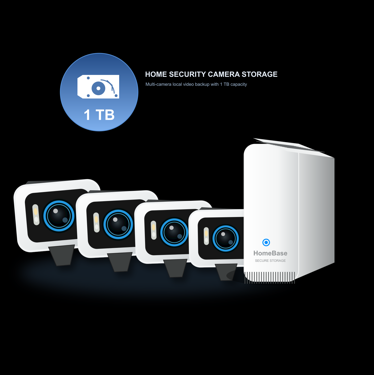
The third version is centralized local storage, such as HomeBase, a hub or an NVR. This is more suitable for multi-camera homes because different cameras can send footage to one place, which is easier to manage and check.
How Cloud Subscription Storage Works
Depending on the provider, a cloud plan may include a set video-history period, richer notifications, AI detection features, or easier remote access.
The core advantage is off-site backup. If the camera is stolen or damaged, cloud footage may still be available since it was uploaded before the incident. Cloud plans can also be easier for users who do not have the spare time to manage memory cards. However, “cloud storage” does not always mean footage is stored indefinitely. It may require you to subscribe to larger storage space, which costs much money.
For frequent travellers and homeowners who want off-site redundancy, cloud storage can be practical and acceptable. The secret lies in understanding what is included and whether the plan fits your privacy preferences.
See also: Protecting Your Digital Life
Local vs Cloud – Which Fits Your Home?
It is more reasonable for people to choose between local and cloud storage based on their lifestyles. Consider privacy first, then the number of cameras and how much backup you want.
- Best for privacy-first homeowners: If protecting your recorded surveillance clips within your own property ranks first, local storage is your ideal choice. This camera storage method lessens dependence on outside servers when you record and view footage regularly, making it perfect for indoor spaces, home entryways and private outdoor zones where you hope to strictly limit who can access your video files. Your data safety also relies on proper usage habits. For example, you should set complex passwords, update device firmware regularly and you should never share your primary account login details with household members. The FTC advises consumers to secure home networks and connected devices because IP cameras and other smart devices can expose personal information if left poorly protected.「Source: FTC」
- Best for multi-camera families: For multi-camera families, an NVR or central hub-based local storage system outperforms using separate SD cards. It stores all footage in one location, supports unified app control and allows easy system expansion. When monitoring your driveway, backyard, gate and front door together, centralized storage avoids checking each camera individually and stops the annoyance of certain SD cards running out of space early in high-traffic monitored areas.
- Best for travellers who want off-site backup: If you are a frequent traveller and spend lots of time away from your home, cloud storage or mixed storage is your top consideration. You can save regular footage locally while backing up key recordings remotely via the cloud, safeguarding your videos from theft of cameras or damage to on-site storage devices.
The comparison table of local and cloud storage is demonstrated as follows:
| Dimensions | Local Storage | Cloud Storage |
| Footage location | Stored on a camera, hub, memory card, or hard drive at home | Stored on remote servers managed by the provider |
| Monthly cost | Often no required storage subscription, depending on the product | Usually requires a monthly or annual plan for video history |
| Privacy control | Keeps everyday recordings closer to the homeowner | Sends footage off-site, so provider policies matter |
| Off-site backup | Limited unless clips are manually exported or backed up elsewhere | Stronger protection if the camera or local device is damaged or stolen |
| Hardware maintenance | May require managing SD cards, hubs, drives, or storage expansion | Less hardware to manage, but plan limits and retention rules still apply |
Storage Capacity – Events vs Continuous Recording
Storage space largely depends on the recording mode you choose. Event-based recording only saves video clips when moving objects, such as intruders and vehicles are detected. Compared with round-the-clock recording, it takes up much less storage space and is suitable for most residential areas, such as front doors and courtyards.
On the contrary, 24/7 continuous recording captures footage nonstop, ideal for commercial premises or high-traffic areas, yet it quickly uses up storage drives and requires larger memory capacity for automatic file overwriting. Besides, multiple factors, including video resolution, frame rate, compression format and night vision recording, determine how long saved footage can be retained.
Before buying, check three things. First, make sure the camera supports the recording mode you want. Second, confirm whether the storage can be expanded. Third, check what will happen when storage is full. A reliable security camera with local storage enables easy automatic overwriting, footage export and review.
What Happens When Power or Wi-Fi Goes Out
When a power outage or Wi-Fi interruption occurs, the storage method you choose can truly demonstrate its value in real-world usage scenarios. If video files are stored on local devices such as cameras, central hubs, or hard drives, the devices will most likely continue to record videos. It depends on the design and construction of hardware, the power supply method you use, and the recording settings you have enabled. Once the network is restored and the device reconnects, you can usually review locally saved clips in the app, depending on the camera model and storage settings.
Power and Wi-Fi outages depend even more on hardware. Battery-powered cameras may continue operating for a period of time, while plug-in cameras need electricity unless connected to backup power. A hub or NVR also needs power to keep receiving and storing video clips. Therefore, do not assume that the security camera local storage can automatically and uninterruptedly record under these scenarios.
For security and privacy, CISA recommends keeping smart devices and related software updated as part of a safer connected home setup. 「Source: CISA」. That advice applies whether footage is stored locally, in the cloud, or both.
eufy Options for Local-First Storage
For those who want a local-first security camera without a subscription and building a complicated system, eufy offers cameras and HomeBase storage solutions without a monthly fee. eufyCam S3 Pro 4-Cam Kit + 1 TB Hard Drive can be regarded as a great choice. This security camera features HomeBase S380, including 16GB built-in storage, which is expandable up to 16TB, while 4K MaxColor Vision helps capture clearer full-color footage in low light. This product also has an integrated SolarPlus 2.0, which can support long-term operation when the camera receives enough direct sunlight. Choose this route if you want multi-camera local backup without a recurring plan.
If you are still comparing camera types, the broader security camera collection is the necessary collection you should check. Some homeowners may also compare eufyCam S4 for a more standalone approach, since it can work independently with 32GB built-in storage, expandable up to 256GB via microSD. When paired with HomeBase S380, it can use HomeBase storage and unlock BionicMind AI. HomeBase S380 includes 16GB built-in storage and can expand up to 16TB, which guarantees the storage of video clips.
Conclusion
When comparing security camera local storage and cloud storage, focus on privacy, convenience, and backup needs. If you want to keep recordings closer to home and reduce recurring fees, eufy local-first storage options are worth considering.
Before purchasing, you should take a three-step strategy. First, start with privacy. Then, count how many cameras you need. Finally, decide whether local-only storage or local storage plus optional cloud backup can give you enough protection. Once these answers are clear, it becomes much easier to choose a camera system to protect your home appropriately.