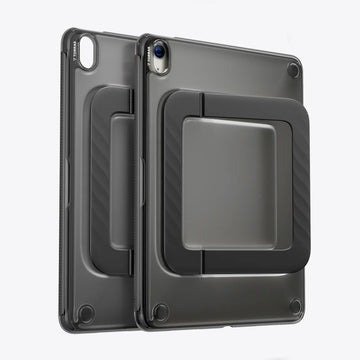
You’ve probably seen it happen before — a once-crystal-clear case slowly takes on that unsightly yellowish tint, turning what was a sleek, minimal look into something that makes your iPad Mini appear old and neglected. It’s one of the most common complaints among tablet users, and it’s genuinely frustrating when a case that was supposed to protect your device ends up making it look worse.
But aesthetics are only half the battle. Your iPad Mini also needs real, reliable protection against drops, bumps, and everyday accidents. Finding an anti-yellowing iPad Mini case that stays clear over time while also delivering serious shock-absorbing performance is a challenge most buyers don’t anticipate until they’ve already made a disappointing purchase or two.
This article tackles both problems head-on. We’ll break down why cases yellow in the first place, what shock-absorbing design actually means in practical terms, and which materials hold up best over time. You’ll also learn how to interpret certifications like MIL-STD-810G and what to look for when comparing your options. By the end, you’ll have everything you need to make a confident, well-informed decision — one that keeps your iPad Mini both protected and looking great for the long haul.
Why Anti-Yellowing Protection is Crucial for Your iPad Mini
That gradual amber tint creeping across your once-transparent case isn’t just bad luck — it’s chemistry. Most clear cases are made from thermoplastic polyurethane (TPU), a flexible polymer that’s prone to a process called photo-oxidation. When UV rays from sunlight or even indoor fluorescent lighting hit the material repeatedly, they break down the polymer chains and trigger oxidation reactions that produce chromophores — molecular structures that absorb light and reflect it back as yellow. Heat accelerates this process, which is why cases left in cars or sunny spots deteriorate noticeably faster.
The problem isn’t purely cosmetic, though the visual impact is hard to ignore. The iPad Mini’s design philosophy centers on clean lines, a slim profile, and a refined aesthetic. Apple puts considerable effort into the device’s appearance, and a yellowed case actively undermines that. What was meant to showcase the tablet’s color and form instead draws attention to degraded plastic, making a relatively new device look worn and uncared for. For users who chose a clear case specifically to preserve the iPad’s original look, this outcome feels like a direct contradiction of the purchase goal.
There’s also a practical dimension worth noting. As TPU yellows, it often becomes more brittle and less flexible, which subtly reduces the material’s ability to absorb and distribute impact energy. A case that looks compromised may actually be structurally compromised as well. This is why the anti-yellowing question can’t be separated from the broader protection conversation. Choosing a case that resists UV degradation isn’t just about keeping things looking fresh — it’s about maintaining the integrity of the material that stands between your iPad Mini and a hard floor. Both goals point toward the same solution: smarter material choices and purpose-built UV resistance from the start.
Understanding Shock-Absorbing Design and Drop Protection
When a case is marketed as “shock-absorbing,” that phrase needs to mean something concrete. In practical terms, effective impact protection comes down to how well a case manages kinetic energy at the moment of a drop. Rather than letting that force transfer directly to your iPad Mini’s glass and aluminum body, a well-designed case intercepts it, disperses it across a wider area, and dissipates it before it can cause damage. The specific design features that accomplish this include air-cushion corners — hollow pockets at each corner that compress on impact like tiny crumple zones — raised bezels around the screen and camera that prevent direct contact with flat surfaces, and multi-layer construction that pairs a rigid outer shell with a softer inner lining. Each layer plays a distinct role: the hard exterior spreads the initial force, while the flexible interior absorbs what’s left.
Not all protection claims are created equal, which is why third-party certification matters. The MIL-STD-810G standard, developed by the U.S. Department of Defense, is one of the most credible benchmarks available for consumer electronics protection. It’s not a single test but a series of procedures that evaluate how equipment performs under real-world stress conditions.
See also: Lifestyle Strategies for Supporting Sustainable Weight Balance
How MIL-STD-810G Certification Ensures Your iPad’s Safety
The tests most relevant to tablet cases include repeated drop testing from defined heights onto hard surfaces, vibration testing that simulates transport and handling, and temperature cycling that checks whether materials maintain their properties under heat and cold. A case that passes these procedures has demonstrated resilience under controlled, repeatable conditions — not just a manufacturer’s internal quality check. Think of it like a car’s crash-test rating: the standard doesn’t guarantee zero damage in every scenario, but it establishes a meaningful baseline. For shock absorption specifically, the physics are straightforward — a softer, thicker material takes longer to decelerate on impact, and a longer deceleration time means lower peak force transmitted to the device. Cases that combine air-cushion geometry with TPU or silicone interiors achieve exactly this effect, making MIL-STD-810G certification a reliable signal that the design actually works under pressure. Brands like TORRAS have built their iPad case lines around this certification, pairing it with explicit anti-yellowing material guarantees — a combination that reflects how seriously the best manufacturers treat both durability and long-term clarity.
Key Features of Durable, Non-Yellowing iPad Mini Cases
The difference between a case that stays crystal clear for two years and one that turns amber within months comes down almost entirely to material science. Standard TPU is inexpensive and flexible, but its molecular structure makes it highly susceptible to UV-induced oxidation. Anti-yellowing cases address this at the formulation level, either by incorporating UV stabilizers — additives that absorb or neutralize UV radiation before it can trigger oxidation — or by using modified TPU compounds with more stable polymer chains. Some manufacturers blend TPU with optical-grade materials that inherently resist discoloration, producing a case that maintains transparency even under prolonged light exposure. When a product explicitly claims “anti-yellowing” or “UV-resistant” construction, look for specifics: a vague marketing claim carries far less weight than a stated material composition or a manufacturer’s guarantee tied to a defined timeframe.
Hybrid construction takes durability a step further by combining two or more materials, each contributing something the other lacks. Polycarbonate (PC) is the most common partner for TPU in these designs. It’s a rigid thermoplastic with excellent impact resistance and dimensional stability — it holds its shape under stress rather than deforming. A PC back panel paired with a TPU bumper frame gives you the best of both: hard-shell protection on the flat surfaces most likely to crack on impact, and flexible shock absorption around the edges where drops typically land first. Silicone is another option worth understanding. It’s softer than TPU, naturally grippy, and highly resistant to temperature extremes, though it tends to attract dust and can feel bulkier in hand.
Beyond raw material choice, longevity depends on construction details that are easy to overlook. A scratch-resistant coating on the back panel prevents surface micro-abrasions from accumulating into visible haze over time. Precise cutouts that fit snugly around ports and buttons prevent debris from working its way inside, which can cause long-term wear on both the case and the device. Reinforced corner geometry — whether through added material thickness or air-cushion pockets — maintains its protective geometry through repeated impacts rather than compressing permanently after the first hard drop. Together, these details separate a case that holds up from one that merely looks good at the point of purchase.
How to Choose the Right Anti-Yellowing Protective Case: A Step-by-Step Guide
Walking into the case market without a clear framework is how most buyers end up disappointed. The options are overwhelming, the marketing language is often vague, and the differences that actually matter aren’t always visible in a product photo. A structured approach cuts through the noise and gets you to the right choice faster.
Step 1: Define your primary use case. Before comparing any products, be honest about how you actually use your iPad Mini. If you take it to job sites, hand it to kids, or carry it in a bag without a dedicated sleeve, maximum drop protection should be your first filter. If it mostly lives on a desk or couch and travels occasionally, a slimmer profile with moderate protection is a reasonable trade-off. Knowing this upfront prevents you from over-buying bulk you don’t need or under-buying protection you do.
Step 2: Demand specific material claims. Don’t accept “clear” or “transparent” as a substitute for “anti-yellowing.” Look for explicit language: UV-resistant TPU, optical-grade materials, or a manufacturer’s written guarantee against discoloration over a defined period. If a product page can’t tell you why the case won’t yellow, assume it will.
Step 3: Verify the protection certification. MIL-STD-810G certification is the clearest third-party signal that a case has been tested against real-world stress. Check whether the listing specifies the drop height tested — a case rated for four-foot drops offers meaningfully different protection than one rated for six feet. Unverified claims like “military-grade inspired” without a certification number deserve skepticism.
Step 4: Examine the design details closely. Measure the lip height around the screen — at least 1.5mm of raised bezel keeps the display off flat surfaces during a face-down drop. Check that button covers are responsive and port cutouts are snug but not obstructive. Reinforced or air-cushion corners should be visible in the product imagery, not just mentioned in the description.
Step 5: Factor in grip and everyday handling. A case you find uncomfortable to hold is one you’ll remove, defeating its purpose entirely. Textured backs, matte finishes, and slightly rubberized edges all improve grip without adding significant bulk. If aesthetics matter to you — and for a clear case, they clearly do — confirm the case is optically transparent enough to show the iPad’s actual color accurately, not just a murky approximation of it.
Clarity and Protection: Making the Right Choice for Your iPad Mini
Protecting your iPad Mini well means solving two problems at once — and now you have the knowledge to do exactly that. A case that yellows within months isn’t just an aesthetic failure; it’s a sign of material degradation that can quietly undermine the very protection you were counting on. And a case that looks great but can’t survive a real-world drop is little more than a decorative sleeve. The right choice addresses both concerns from the ground up.
Materials are where everything starts. UV-resistant TPU, optical-grade compounds, and polycarbonate hybrid constructions aren’t marketing buzzwords — they’re the specific choices that determine whether your case stays clear and structurally sound a year from now. Pair that with verified MIL-STD-810G certification, and you move from trusting a manufacturer’s claims to trusting a tested, repeatable standard. Add thoughtful design details — air-cushion corners, raised bezels, precise cutouts — and you have a case that earns its place on your device.
When you’re ready to buy, hold any candidate to a simple standard: it must explicitly promise resistance to yellowing through stated materials or a written guarantee, and it must back up its protection claims with recognized certification. Anything less is a compromise you’ll likely regret. Your iPad Mini deserves a case that keeps it looking new and performing safely — and with the right information, that case is well within reach.